Is a Used RTX 3060 12 GB Still the Sensible Cheap GPU for Local LLMs?

Marcus Feldmann
November 15, 2026
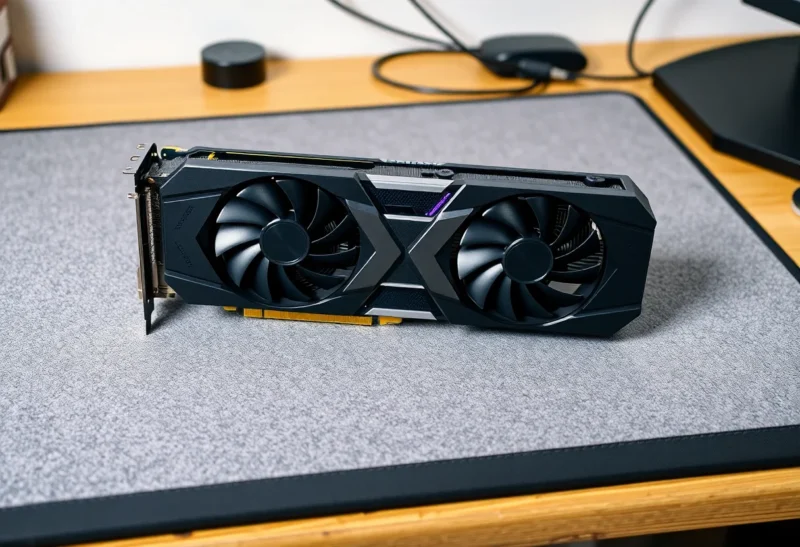
For a few years, the advice for anyone building a budget machine for local language models was almost automatic: buy a used RTX 3060 with 12 GB of VRAM. It was cheap on the second-hand market, had more memory than many newer mid-range cards, and ran everything with NVIDIA’s CUDA support.
In 2026 the market looks different. There are newer 16 GB cards, Intel’s Arc B580 offers 12 GB at a low price, and models themselves have changed. This article asks whether the RTX 3060 12 GB is still the sensible cheap choice for running local LLMs at home, and when a different card makes more sense.
Why VRAM matters more than raw speed
For local LLMs, the first question is whether the model fits in GPU memory. If it fits, the GPU generates text quickly. If it doesn’t, tools like Ollama and llama.cpp split the model between GPU and system RAM, and speed drops sharply because the slow part runs on the CPU. We explained that in detail in what happens when a local LLM doesn’t fit in VRAM.
Rough memory needs at a common 4-bit quantisation, including some room for context:
- 7B to 8B models: about 5 to 6 GB. Fit comfortably in 8 GB.
- 12B to 14B models: about 8 to 10 GB. Need 12 GB to run fully on the GPU with a reasonable context.
- 24B to 32B models: about 15 to 20 GB. Need 16 GB at the very least, and 24 GB to be comfortable.
- 70B models: about 40 GB or more. Out of reach for a single consumer card in this price range.
Long context windows add memory on top of the model weights. A card with a little headroom lets you use longer prompts and documents without spilling over.
What the RTX 3060 12 GB still gets right
- 12 GB of VRAM. Enough to run the 12B to 14B class of models fully on the GPU, which in 2026 includes many strong general and coding models. An 8 GB card has to drop down to the 8B class or spill.
- Memory bandwidth of about 360 GB/s. Text generation speed is largely limited by how fast the GPU can read the model’s weights. The 3060’s 192-bit bus beats the RTX 4060 8 GB’s roughly 272 GB/s.
- CUDA. Every popular local AI tool, including Ollama, llama.cpp, LM Studio, vLLM and ComfyUI for images, supports NVIDIA cards first and best. Setup is usually just installing the driver.
- Modest power. About 170 W under load, with an ordinary power connector, so it fits most existing PCs and small servers.
On the used market it has often cost less than a new 8 GB card, which is why it became the default recommendation.
Where it falls short now
- 12 GB is a ceiling. The popular 24B to 32B models don’t fit. If those are what you want to run, the 3060 pushes you back into slow CPU offloading.
- It’s an older generation. The 3060 lacks some newer features, such as the FP8 support on later architectures that some newer inference tools use for speed. For llama.cpp-based tools with standard quantisations this matters little, but for other frameworks it can.
- Used-card risk. Second-hand cards may have been run hard for years. Buy from sellers with returns, check temperatures and fan noise under load, and expect that a fan may need replacing eventually.
- Two models: 12 GB and 8 GB. There is also an RTX 3060 with only 8 GB, on a narrower bus. Make sure the listing is for the 12 GB version.
The alternatives at a similar budget
RTX 4060 8 GB. Newer and more power-efficient, but only 8 GB and lower memory bandwidth. For LLMs it is usually worse than a 3060 12 GB, because it can’t hold the 12B to 14B models. It makes sense only if you also game and want the newer features.
RTX 4060 Ti 16 GB and RTX 5060 Ti 16 GB. 16 GB opens up larger models and longer contexts. Bandwidth is about 288 GB/s on the 4060 Ti and noticeably higher on the newer 5060 Ti. They cost more than a used 3060, but if you know you want models in the 20B range, 16 GB is a meaningful step up.
Intel Arc B580 12 GB. Launched at a low price with 12 GB and good memory bandwidth on paper. Software support for local LLMs has improved through llama.cpp’s Vulkan and SYCL back ends and Intel’s own tools, but it is still less plug-and-play than CUDA. Expect more setup and more checking of compatibility lists. A reasonable choice for tinkerers, less so for people who want it to just work.
AMD Radeon cards with 16 GB. Cards such as the RX 7600 XT offer 16 GB at a mid-range price. Support through ROCm and Vulkan in Ollama and llama.cpp is much better than it was, but depends on the exact model and operating system. Check that your card is on the tool’s supported list before buying.
Used RTX 3090 24 GB. A much bigger budget and power draw (about 350 W), but 24 GB and very high bandwidth make it the classic choice for 30B-class models. If your budget can stretch, it is in a different league for LLMs.
What it’s like to use day to day
With a 3060 12 GB, an 8B model at 4-bit typically generates text well above reading speed, and a 12B to 14B model fits fully on the card with usable speed for chat, summarising and coding help. That is a genuinely useful local assistant for a household or a small homelab, with no per-token costs and nothing leaving your network.
Where it feels limited is when you compare the answers with larger models. If you find yourself constantly wanting the 27B or 32B version of a model, the card’s limit, not its speed, will be the frustration.
For image generation, 12 GB is comfortable for common Stable Diffusion workflows and many newer image models at moderate resolutions, which adds to its usefulness on a mixed-use machine.
Testing a used card before you rely on it
If you buy second-hand, test the card in the first days while you can still return it:
- Check the card reports 12 GB of VRAM in
nvidia-smion Linux or Task Manager on Windows. - Load the largest model you plan to use and run a long generation, several minutes of continuous output, while watching temperature and fan speed with
nvidia-smi. Temperatures that climb steadily towards the card’s limit suggest dried thermal paste or failing fans. - Listen for fan rattle or grinding at different speeds.
- Run a graphics stress test for 20 to 30 minutes. Crashes or visual artefacts are a reason to return the card.
A card that passes these checks is likely to serve well for years of local AI use, which is much gentler than mining or heavy gaming.
What about two cards?
Tools like Ollama and llama.cpp can split a model across two GPUs, so two 3060 12 GB cards give 24 GB of combined VRAM for larger models. It works, and some homelab builders do exactly this. But it needs a motherboard with two suitable PCIe slots, enough power and cooling, and generation speed won’t double. Each card still reads its half of the model at its own bandwidth. For most people, one card with more memory is simpler than two smaller ones.
Power, noise and the always-on question
A GPU in a home server that runs all day matters for your electricity bill. The 3060 idles at a modest wattage, and under load uses around 170 W. If the model sits idle most of the day, average draw stays reasonable. Our article on how much electricity a local LLM uses has worked examples.
If the card goes in a small server under a desk, check the case airflow and the card’s length before buying. Many 3060 models are short, dual-fan designs that fit compact cases well, which is part of their appeal.
So is it still the sensible cheap choice?
For many people, yes, with conditions. A used RTX 3060 12 GB is still a good buy if:
- your budget is tight and you want CUDA’s easy setup;
- you plan to run models up to about 14B parameters, which covers most everyday assistant and coding tasks;
- you can buy from a seller with returns and test the card under load.
Spend more on a 16 GB card if you already know you want 20B to 32B models or very long contexts, and consider a used 3090 if you can afford its price and power. Skip 8 GB cards for LLM work unless they are almost free, because the models people most want to run keep growing.
And if you’re deciding between a GPU and more system RAM, or wondering whether you need a GPU at all, our guides on more RAM or a better GPU and running a useful local LLM without a GPU cover those trade-offs.