PCIe Lane Budgeting: When Your GPU and NVMe Fight for the Same x4 Exit

Tomasz Wojcik
May 9, 2026
Shopping for a fast SSD in 2026 still begins with sequential read charts and ends with a quiet motherboard footnote: “M.2 slot shares bandwidth with…” That ellipsis is where GPUs, chipset uplinks, and marketing collide in the real world. PCIe lanes are finite currency. Spend them twice and nobody gets the vacation they were promised—not your RTX card, not your Gen5 drive, and definitely not the friend who trusted your parts list.
This article explains how CPU-attached lanes differ from chipset lanes, why your “x16 GPU” sometimes negotiates x8, and how to read manuals so your storage performance story matches physics instead of the front of the retail box. No purchase links, no tribal chipset wars—just the accounting sheet your motherboard manual already printed if you squint past the RGB photos.
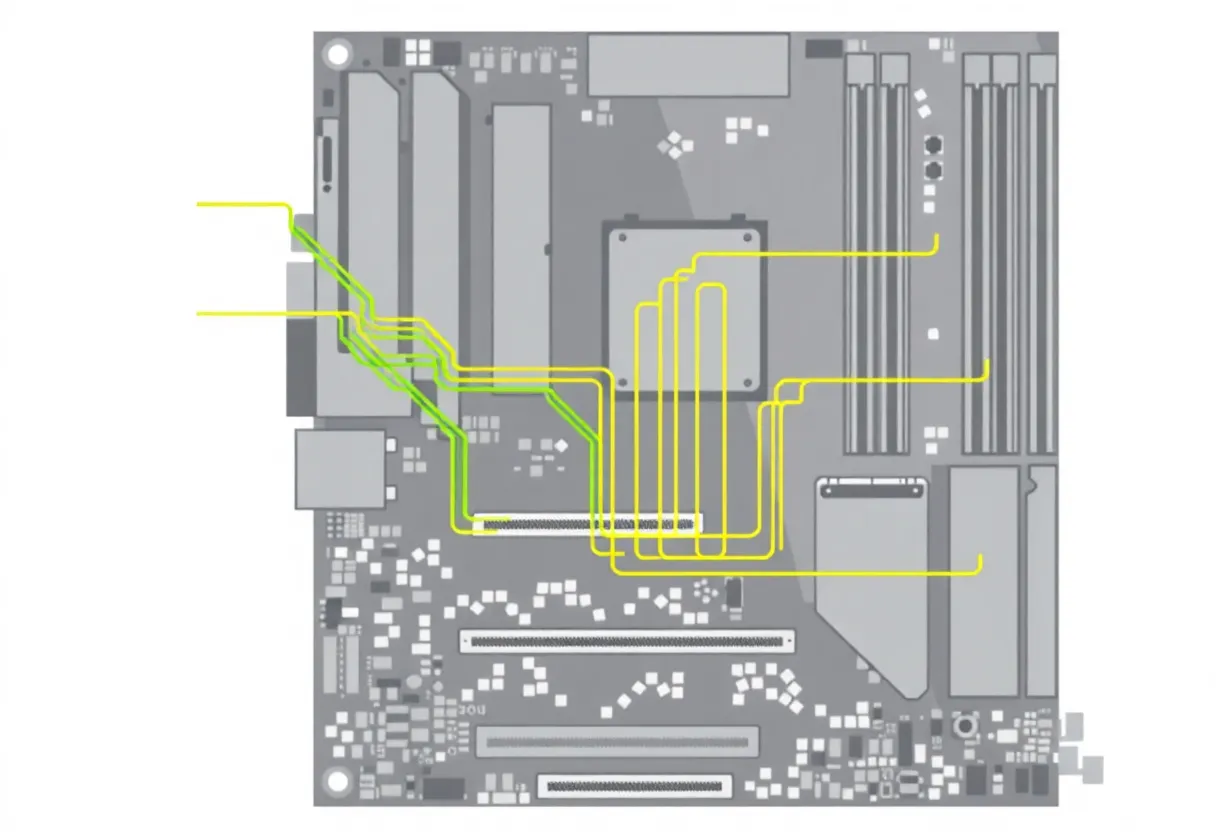
The two treasuries: CPU versus PCH
Modern desktop CPUs expose a limited number of high-speed PCIe lanes directly—often earmarked for primary graphics and one or two NVMe slots. Everything else typically funnels through the chipset (PCH) over a narrower uplink historically nicknamed “DMI” on Intel platforms or the equivalent x4-ish link on AMD boards. That uplink is fine for NICs, SATA, USB controllers, and casual storage—but saturating it with multiple fast NVMe drives while also copying huge files over USB4 is how you rediscover contention without a single error message.
Rule of thumb: the drive you benchmark for bragging rights should live on a CPU-attached M.2 slot when possible. Scratch disks for video editing belong there too. Archive HDDs and secondary “games I barely play” SSDs can ride the chipset bus like economy passengers—still fine seats, just not where you expect champagne throughput when the cabin is full.
Why your GPU dropped to x8 without asking you nicely
Installing a drive in certain M.2 slots electrically bifurcates the GPU link. The card still fits in a mechanical x16 slot; electrically it becomes x8. For most gaming GPUs on PCIe 4.0 or 5.0, that is rarely the bottleneck compared to shader limits—plenty of reviews prove it—but workstation users running double-precision workloads or niche GPGPU scenarios should read the block diagram before assuming marketing’s “x16 only” mythos.

Gen numbers versus lane width
PCIe speed scales with both generation and lane count. Four lanes of Gen5 roughly equals eight lanes of Gen4 in many charts—which is why a x4 Gen5 drive can match a x8 Gen4 device in synthetic tests while still hammering the same CPU traces. Motherboard vendors love slapping “Gen5 ready” stickers everywhere; fewer love explaining that two Gen5 devices might time-share lanes unless you buy a HEDT platform with a deeper wallet.
Think in “GT/s per lane” when comparing marketing tables to reality. Negotiated link speed can downshift if a riser cable is marginal, if a slot is wired only to x2 electrically, or if a drive thermal-throttles firmware-side and the error reporting misleads beginners into blaming width first. GPU-Z on Windows and lspci -vv on Linux show negotiated widths—use them after every hardware change.
PLX switches and the workstation exception
Some workstation boards re-expand lanes with PCIe switches (PLX and competitors). That adds latency and cost but lets many x16 mechanical slots coexist politely—until everyone talks at once. Consumer boards rarely include switches; when they do, read whether the switch sits upstream or downstream of the GPU path. Switches are not magic beans; they serialize under simultaneous pressure.
Thunderbolt, USB4, and the dock that ate your bandwidth
Laptops taught us this lesson first: a Thunderbolt dock multiplexes display, NIC, and NVMe over a fixed tunnel back to the CPU. Desktops with TB header cards echo the pattern. If you hang a fast external SSD enclosure off a dock while also expecting full internal chipset throughput, you are competing for the same uplink budget again—just with prettier cables.
Riser cables and vertical mounts: the mechanical x16 trap
A vertical GPU bracket still needs a Gen4-rated riser if you expect Gen4 stability. Cheap ribbons negotiate down silently; games still run, but your “VRAM bottleneck” Reddit thread might actually be a link margin problem. Buy once, cry once, and verify width after install.
Chipset heat and hidden throttling
PCH fans returned for a reason. Chipsets that multiplex NVMe, SATA, and USB move packets through silicon that can throttle when thermally unhappy. If your secondary SSD mysteriously dips during long copies, check PCH temperature sensors before blaming NAND wear. A $15 fan aimed at the heatsink beats a $200 RMA spiral.
Practical build recipes
- Single fast GPU + one flagship SSD — put SSD in top CPU M.2 per manual; verify GPU link width in BIOS OS after boot.
- Dual SSD content box — primary NVMe CPU-attached; secondary on chipset with projects split by access pattern, not alphabetically.
- 10 GbE add-in card — prefer CPU slot if you saturate NAS; otherwise measure before buying another NIC.
Laptops cheat differently
Remapped lanes and OEM-specific muxes make desktop intuition dangerous. A “second M.2” might always be chipset-class or might disable WWAN. This article focuses on desktops, but the lesson carries: read the service manual, not Reddit confidence from 2021 threads.
Capture cards, 10 GbE, and the open-slot Tetris problem
Add-in cards still matter for streamers and homelabbers. A PCIe x4 capture device plus a x4 NIC plus a GPU that refuses to drop below x16 is sometimes mathematically impossible on mainstream CPUs. Decide priorities: encode on GPU and skip the capture card lane fight, or accept x8 GPU mode and verify encoder quality first. There is no universal winning stack—only honest trade-offs drawn on the diagram.
The ghost of mining risers
The era of x1 USB risers for GPUs left a vocabulary stain: people still assume any open-ended slot is “full speed.” Electrically, x1 is x1. If you adapt storage through odd paths, expect odd numbers. Modern builds rarely need those hacks; when they appear in SFF cases, treat them as engineering contracts with thermal and signal-integrity clauses, not hacks.
BIOS toggles that rescue budgets
Above 4G decoding, Resizable BAR, and bifurcation options interact with lane routing on some boards. Flipping features for compatibility can silently reshuffle resources. After major BIOS updates, re-check negotiated link speeds—vendors occasionally reorder defaults. Screenshot your working settings; “BIOS optimized defaults” is a polite name for amnesia.
Stop blaming the SSD first
CrystalDiskMark hero numbers require the whole path: cooling, queue depth settings, background antivirus, and whether Windows is indexing a freshly cloned drive. If sequential reads look Gen3-slow on a Gen5 drive, verify slot wiring before RMAing NAND. Half of “bad SSD” threads are lane math in disguise.
SFF cases: where the block diagram becomes a personality test
Small-form-factor boards relocate M.2 slots behind the motherboard tray, sandwich them against the GPU backplate, or stack them on risers. Thermals interact with sustained throughput: a Gen5 drive thermally unhappy may not downshift PCIe generation, but it will throttle NAND and look like “bad lanes.” Add a slim fan, use a copper heatsink with actual fin height, and re-test before declaring defeat.
Intel versus AMD: stop memorizing lane maps, learn the search pattern
Exact lane budgets change per CPU generation and IO die layout. Instead of memorizing forum posts, open the official CPU PCIe capability table and the motherboard PDF on a second monitor. Highlight CPU-attached versus PCH-attached ports in different colors. Ten minutes with highlighters saves ten hours of forum archaeology later.
CXL and composable memory (the “coming soon” footnote)
Enterprise platforms talk about CXL memory expansion consuming precious CPU lanes in new ways. Consumer spillover is years behind and uneven. Still, the vocabulary matters: “lanes are currency” will remain true when accelerators multiply. If you skim enterprise keynotes, translate them back to your desktop question: who pays the lane tax, and when?
A troubleshooting sequence that respects your evening
- Note advertised vs negotiated link width and generation for GPU and each NVMe.
- Move the suspect SSD to the manual’s “CPU direct” slot; retest.
- Idle PCH temperature, then load copy from NAS + internal SSD simultaneously; watch for correlated dips.
- Update BIOS after backing up settings; re-verify—AGESA and microcode updates occasionally reshuffle defaults.
If width is correct but numbers lag, pivot to thermals and software—do not chase ghosts in copper traces first.
When to stop counting and play games
If you are on a sensible mid-tier GPU at 1440p, arguing over x8 versus x16 is usually procrastination. If you are building a PCIe 5 capture + 10 GbE + triple NVMe ingest box, lane budgeting is the design—start with the block diagram, not the case RGB.
Warranty departments love mysterious “instability” tickets that trace to marginal risers and overcrowded chipset loads. Document your layout once, screenshot negotiated links after each upgrade, and future-you inherits sanity when swapping GPUs at midnight before a LAN party.
PCIe is boring infrastructure until it is not. Respect the map, label your drives in your head like a pilot uses fuel tanks, and your benchmarks will finally match the story you tell your friends—without an asterisk hiding quietly in the motherboard PDF footnotes.