Monitor Arm Height vs the Stock Stand: The Neck Angle a Second Screen Adds

Nate Osborn
September 21, 2026
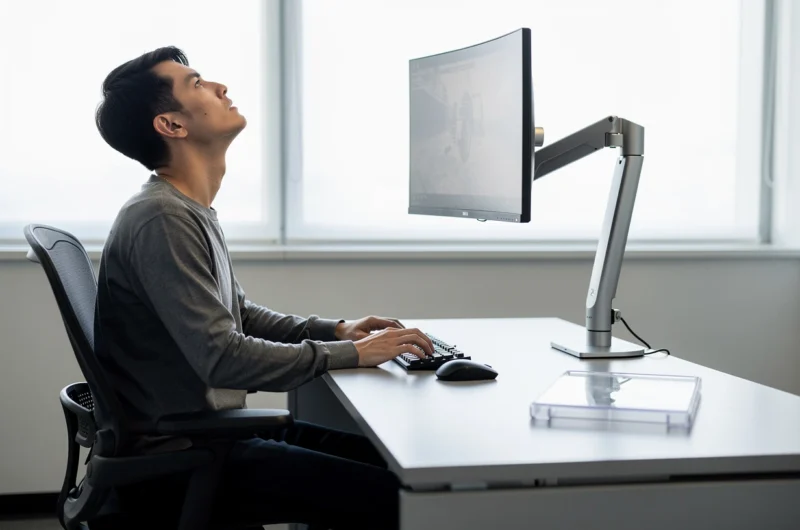
Adding a second monitor without changing how it sits is how desks become neck machines. The stock stand that came in the box was designed to survive shipping and look fine in a product photo—not to keep your gaze level when a second panel joins the party. Monitor arms are not a luxury aesthetic. They are how you undo the angle a second screen quietly adds to every hour you work.
This is about height, tilt, and the difference between “I can see it” and “I can live with it for years.”
What the stock stand optimizes for
Stock stands prioritize stability, cost, and a small packing carton. Height travel is often minimal. Tilt exists; pivot and true vertical alignment with a second panel usually do not. The primary display ends up a little low because that is how it looked in the brochure beside a laptop. Fine for one screen. Awkward when you add a neighbor.
A low primary forces you to look down. A second screen placed beside it on another stock stand often sits at a different height because the stands do not match, or because one panel is larger. Your neck becomes the hinge that reconciles the mismatch. You will not notice in an afternoon. You will notice in a month.
Stock stands also waste depth. The chunky base pushes the panel farther from the wall and closer to your face than an arm would. Closer feels bigger until it feels like you are sitting in the front row of a theater you did not buy tickets for.

What an arm actually changes
A decent arm gives you independent height, depth, tilt, and often rotation. You can align the top edges of two panels, pull the primary back, and float a vertical log screen at a height that does not require a chin lift. You can shove both displays against the wall when you need desk space for a keyboard, a soldering mat, or lunch.
Arms also let you park a screen for focus mode: push the secondary up and away, or angle it out of peripheral vision. Stock stands cannot do that without becoming a lifting exercise.
The catch is mount quality and desk compatibility. Clamp arms need a thick enough desk edge and a clear underside. Grommet mounts need a hole. Cheap arms droop, vibrate when you type, and slowly lose height. A bad arm is worse than a stock stand because it trains you to distrust adjustments and leave everything wrong.
The neck angle a second screen adds
With one monitor, you can cheat: raise the chair, stack a book under the stand, lean the panel. With two, cheats multiply. If the secondary is even slightly higher or lower, your eyes saccade and your neck follows. Chat windows on a high secondary are a classic trap—constant micro-looks upward while the editor sits lower.
Aim for a simple geometry: primary centered, top of the active text region near eye height when you sit neutrally, secondary at the same top line or slightly lower so reference glances go sideways, not diagonally up. Sideways is cheaper for your spine than diagonals.
Laptop-as-second-screen is its own villain. A laptop on the desk beside a monitor almost always sits too low. If you must use it, elevate it or accept that it is a temporary reference, not a permanent pane. Arms will not fix a laptop hinge that was never meant to be your secondary.
Setup checklist that takes twenty minutes
- Sit as you actually sit—not as you sit for posture photos.
- Close your eyes, face forward, open them. Where you look first should be the editor, not the bezel bottom.
- Align top bezels of dual screens; then fine-tune so content centers match more than bezels do.
- Pull panels back until you are not leaning away from sharpness.
- Type for ten minutes. If the arm wobbles, tighten or replace; do not live with shake.
Revisit after a week. Desks settle. Clamps creep. Your preferred chair height changes when you get a new cushion. Arms make those revisits possible; stock stands make them arguments with plastic ratchets.
When the stock stand is still fine
Keep the stock stand if you have one carefully chosen primary, you already raised it adequately, and you are not adding a second panel. Keep it for a temporary desk or a machine you barely use. Keep it if your desk cannot accept a clamp and you refuse to drill.
Do not keep it as a purity stance against “gamer” arms. Most good arms now are boring office hardware. The aesthetic is optional; the degrees of freedom are not.
Buying notes without a brand sermon
Match VESA patterns, check weight ratings with margin, prefer gas springs you can tension, and read whether the arm supports the depth of an ultrawide if that is your panel. For a light secondary used in portrait, a simpler arm can suffice. For a heavy primary you bump daily, buy the arm that does not droop in reviews after six months.
Cable management is part of height. A tight HDMI cable will yank the panel crooked every time you adjust. Route with slack for the full range of motion you intend to use.
Standing desks make arms non-optional
If the desk moves, the stand that “was fine sitting” becomes a daily re-aim problem. Arms let you preset a sitting height and a standing height with a quick shove instead of unscrewing a riser. Stock stands turn every sit/stand transition into a compromise: either the sitting posture is wrong or the standing posture is wrong. Dual monitors double the compromise.
People blame the standing desk for discomfort when the displays never traveled with their eyes. Fix the mounts before you abandon the desk.
Second screens used for meetings
Video calls on a secondary panel create another angle: you look at faces off-center for an hour while the camera sits on the primary. Arms help you pull the call window closer to the camera line so you are not presenting your ear to colleagues. That is not vanity. It is how you avoid a stiff neck after “quick” syncs that were not quick.
If meetings dominate certain days, give the call window a dedicated, correctly aimed surface—and permission to shut the log scrollers off so you are not triangulating between gallery view and a failing deploy.
Decision rule
If a second screen made your neck narrate the workday, the missing product is probably not another panel—it is height control. Arms exist to erase the angle stock stands force when desks grow from one display to two.
Buy the arm before you buy a fancier monitor you will still mount too low. Sharpness does not help a cervical spine. Alignment does.
Stock stands ship the monitor. Arms install it into a body. If you only ever use one screen at a fixed height you already fixed with a riser, stay. The moment a second panel joins—or the moment you catch yourself craning toward a log window—measure eye height and spend the money that makes the geometry honest.
Your future self does not remember the product photo of the stand. Your future self remembers whether Tuesday’s debugging session required a heating pad. Choose the mount that keeps Tuesday boring.
One practical compromise for rented desks: a solid monitor riser for the primary plus a light arm for the secondary only. You get alignment where glances happen most without fighting a landlord about clamps. Another compromise: keep the stock stand on a rarely used panel and arm the screen you stare at for six hours. Spend freedom where your neck spends time.
If you already own an arm and still hurt, do not assume you need a different chair first—or only. Re-check height after every major desk change: new keyboard tray, new sitting/standing conversion, new laptop stand. The arm’s job is continuous, not one-time. Treat it like tire pressure. Ignore it and the handling goes wrong slowly.
Finally, treat cable length as part of ergonomics. Undersized DisplayPort cables yank panels crooked; power bricks hanging from the arm add droop. Budget an hour for cable routing when you install the arm. The geometry only stays correct if the wiring allows the range of motion you planned on paper.